Pages

.

Showing posts with label Tutorial. Show all posts

TypeConverters with Custom Types, Static or Instance Methods? | Android Room Persistence Library


There's all the useless copy and paste tutorials out there that only use the Date object. Congratulations authors, on adding nothing to the world. Then there is the inconsistency on whether the @TypeConverter methods should be static or instance. I'll sort this out in this tutorial.


1. Static, or Instance, @TypeConverter Methods?

Short Answer: It doesn't matter, choose which ones you want to use. The generated code will account for this.

I looked at the generated code, as I was using static methods for the Date Converters and instance methods for my custom types Collection Converters.

1.1. Static Methods

The generated code, used static calls and it didn't make an attempt to make an instance out of the Date Converters class.

Static Declatation
public class DateConverters {

  @TypeConverter
  public static Long dateToTimestamp(Date date) { ... }
  ...
}


Generated Code from Static Declaration
public BikeRaceDao_Impl(RoomDatabase __db) {
  ...
  final Long _tmp =
    DateConverters.dateToTimestamp(
        value.getStartDate());
  ...
}

1.2. Instance Methods

The generated code, made an instance of the CollectionConverters class and used the methods with the instance.

Instance Declaration

public class CollectionConverters {

  @TypeConverter
  public String stringSetToString(Set<String> stringSet);
  ...
}

Generated Code from Instance Declaration
public class ProfileFilterDao_Impl
           implements ProfileFilterDao {
  ...
  private final CollectionConverters __collectionConverters =
      new CollectionConverters();
  ...
  public ProfileFilterDao_Impl(RoomDatabase __db) {
    ...
    _tmp_1 =
        __collectionConverters.stringSetToString(
            value.getCategories());
    ...
  }
}

1.3. Conclusion

I would suggest that we use Static methods, with a private constructor to prevent instances of these classes being misused, as per Effective Java 3rd Edition Item Four: Enforce noninstantiability with a private constructor.


2. @TypeConverter methods with Custom Types

As I've said in the Conclusion above, I've gone for static methods with a private constructor. I am using GSON to convert my POJOs to JSON for storage in the database.


/**
 * Converters for the RoomDatabase.
 * This class keeps the Converters for Collections together.
 */
public class CollectionConverters {

  @TypeConverter
  public static String stringSetToString(
           Set<String> stringSet) {

    return (stringSet == null || stringSet.isEmpty()) ?
        null : new Gson().toJson(stringSet);
  }

  @TypeConverter
  public static Set<String> stringToStringSet(
           String string) {

    if (string == null || string.isEmpty())
        return null;

    Type setType =
        new TypeToken<HashSet<String>>() {}.getType();

    return new Gson().fromJson(string, setType);
  }

  @TypeConverter
  public static String raceTypeSetToString(
           Set<RaceType> raceTypeSet) {

    return (raceTypeSet == null || raceTypeSet.isEmpty()) ?
        null : new Gson().toJson(raceTypeSet);
  }

  @TypeConverter
  public static Set<RaceType> stringToRaceTypeSet(
           String string) {

    if (string == null || string.isEmpty()) return null;

    Type setType =
        new TypeToken<HashSet<RaceType>>() {}.getType();

    return new Gson().fromJson(string, setType);
  }

  /**
   * Preventing Instancing with a Private Constructor.
   */
  private CollectionConverters() {
    throw new AssertionError(
      "Class should not be instantiated");
  }
}

Thank you for reading and I hope this helped.
reade more... Résuméabuiyad

Android Room Database Tutorial with Fragments, RecyclerView, LiveData, ViewModel and Data Binding


Intro

This tutorial will implement an Android App with Room Database, Fragments, RecyclerView, LiveData, ViewModel and Data Binding. Lets stop messing around, we'll get to the code.


Step 0 - The App's Build.Gradle file

We need to add the following to the app/build.gradle file for the app to work. We're using Java 1.8 for the Lambda in the Fragment and Data Binding.

android {
...
compileOptions {
sourceCompatibility JavaVersion.VERSION_1_8
targetCompatibility JavaVersion.VERSION_1_8
}
dataBinding {
enabled = true
}
}

dependencies {
...
implementation "android.arch.lifecycle:extensions:1.0.0"
implementation "android.arch.persistence.room:runtime:1.0.0"
annotationProcessor "android.arch.persistence.room:compiler:1.0.0"
testImplementation "android.arch.persistence.room:testing:1.0.0"
}


Step 1 - Database Entity, the Model

Start with the Data Driven Design, we'll first implement the model.

@Entity
public class BlogPost {

@PrimaryKey(autoGenerate = true)
private int id;

@ColumnInfo(name = "title")
private String title;

/**
* Default Constructor
*
* Room Database will use this no-arg constructor by default.
* The others are annotated with @Ignore,
* so Room will not give a warning about "Multiple Good Constructors".
*/
public BlogPost() {
}

@Ignore
public BlogPost(String title) {
this.title = title;
}

// Setters and Getters...
}


Step 2 - DAO - Data Access Object

We'll need to outline an interface class that will allow us to access the Database's content via queries.

@Dao
public interface BlogPostDao {

@Query("SELECT * FROM blogpost")
LiveData<List<BlogPost>> getAllBlogPosts();

@Query("SELECT * FROM blogpost WHERE id = :id LIMIT 1")
LiveData<List<BlogPost>> findBlogPostById(long id);

@Query("SELECT * FROM blogpost WHERE title LIKE :title LIMIT 1")
LiveData<List<BlogPost>> findBlodPostByTitle(String title);

@Query("SELECT COUNT(*) FROM blogpost")
int rowCount();

@Insert
void insertBlogPosts(BlogPost... blogPosts);

@Update
void updateBlogPosts(BlogPost... blogPosts);

@Delete
void deleteBlogPosts(BlogPost... blogPosts);
}


Step 3 - Room Database Implementation

To access the generated DAO class, the RoomDatabase needs to be implemented.

@Database(entities = {BlogPost.class}, version = 1, exportSchema = false)
public abstract class BlogPostDatabase extends RoomDatabase {

private static BlogPostDatabase INSTANCE;

public static BlogPostDatabase getInstance(Context context) {
if (INSTANCE == null) {
INSTANCE = Room.databaseBuilder(
context.getApplicationContext(),
BlogPostDatabase.class,
"BlogPostsDatabase")
.build();
}

return INSTANCE;
}

public static void destroyInstance() {
INSTANCE = null;
}

public abstract BlogPostDao blogPostDao();
}


Step 4 - View Model Implementation

The AndroidViewModel show the LiveData List that the MainActivity and MainFragment will observe.

public class BlogPostsViewModel extends AndroidViewModel {

private final LiveData<List<BlogPost>> blogPosts;

public BlogPostsViewModel(@NonNull Application application) {
super(application);

blogPosts = BlogPostDatabase
.getInstance(getApplication())
.blogPostDao(
.getAllBlogPosts();
}

public LiveData<List<BlogPost>> getBlogPosts() {
return blogPosts;
}
}


Step 5 - RecyclerView Adapter

To populate the RecyclerView, we'll need the Adapter.

public class MainActivityFragmentRecyclerViewAdapter extends
RecyclerView.Adapter
<MainActivityFragmentRecyclerViewAdapter
.MainActivityFragmentRecyclerViewHolder> {

private List<BlogPost> blogPosts;

public MainActivityFragmentRecyclerViewAdapter(List<BlogPost> blogPosts) {
this.blogPosts = blogPosts;
}

@Override
public MainActivityFragmentRecyclerViewHolder onCreateViewHolder(
ViewGroup parent, int viewType) {
RecyclerItemBinding itemBinding = RecyclerItemBinding.inflate(
LayoutInflater.from(parent.getContext()), parent, false);

return new MainActivityFragmentRecyclerViewHolder(itemBinding);
}

@Override
public void onBindViewHolder(
MainActivityFragmentRecyclerViewHolder holder, int position) {
String blogPostTitle = blogPosts.get(position).getTitle();
holder.bind(blogPostTitle);
}

@Override
public int getItemCount() {
return blogPosts.size();
}

public void setBlogPosts(List<BlogPost> blogPosts) {
this.blogPosts = blogPosts;
notifyDataSetChanged();
}

static class MainActivityFragmentRecyclerViewHolder
extends RecyclerView.ViewHolder {

RecyclerItemBinding binding;

MainActivityFragmentRecyclerViewHolder(RecyclerItemBinding binding) {
super(binding.getRoot());
this.binding = binding;
}

void bind(String blogPostTitle) {
binding.blogPostTextView.setText(blogPostTitle);
binding.executePendingBindings();
}
}
}


Step 6 - Observing the ViewModel in the Fragment

We observe the ViewModel and use it to update the RecyclerView's content.

public class MainActivityFragment extends Fragment {

public MainActivityFragment() {
}

@Override
public View onCreateView(
LayoutInflater inflater,
ViewGroup container,
Bundle savedInstanceState) {

FragmentMainBinding binding =
DataBindingUtil.inflate(
inflater, R.layout.fragment_main, container, false);

MainActivityFragmentRecyclerViewAdapter recyclerViewAdapter =
new MainActivityFragmentRecyclerViewAdapter(new ArrayList<>());

binding.recyclerView.setLayoutManager(
new LinearLayoutManager(getActivity()));

binding.recyclerView.setAdapter(recyclerViewAdapter);

BlogPostsViewModel viewModel =
ViewModelProviders.of(this).get(BlogPostsViewModel.class);

viewModel.getBlogPosts().observe(
MainActivityFragment.this, recyclerViewAdapter::setBlogPosts);

return binding.getRoot();
}
}


Step 7 - The Other Fragments and Activities

There's not too much craziness in the other Fragments and Activities. We're using DataBinding and there's an Activity-Fragment pair for adding a new Database Entry.

The Activity Package on GitHub: AndroidRoomDatabaseTutorialBasic / activity.


Step 8 - The Layout Files

There's no magic in the layout files. They only have the layout tag for the Data Binding to work. So I'll leave the link to the directory from the Git Hub.

The Layout Directory on GitHub: AndroidRoomDatabaseTutorialBasic / main / res / layout.


Step 9 - Optionally add a Database Intialiser

We can use the following class to populate the database with hard coded data.

public class DatabaseInitializer {

public static void populateAsync(final BlogPostDatabase database) {
new PopulateDbAsync(database).execute();
}

private static class PopulateDbAsync extends AsyncTask<Void, Void, Void> {

private final BlogPostDatabase database;

PopulateDbAsync(BlogPostDatabase database) {
this.database = database;
}

@Override
protected Void doInBackground(final Void... params) {
// If the Database is empty, add the initial data.
if (database.blogPostDao().rowCount() == 0) {
List<BlogPost> blogPosts = new ArrayList<>();
blogPosts.add(new BlogPost("Blog Post #1"));
blogPosts.add(new BlogPost("Blog Post #2"));
blogPosts.add(new BlogPost("Blog Post #3"));

database.blogPostDao()
.insertBlogPosts(
blogPosts.toArray(new BlogPost[blogPosts.size()]));
}

return null;
}
}
}


Examining The Database

Using DB Browser for SQL Lite, we can attach it to the database file to view the database. The database file can be got in Android Studio's Device File Explorer view.

The database file is in the directory: data/data/com.package/database/


reade more... Résuméabuiyad

PhantomJS and Jsoup with Spring Boot


You'll need to have PhantomJS installed locally and on the PATH, you can accomplish this by following my Install Instructions for Mac.

Gradle Dependencies

In your Spring Boot project add the following Gradle dependencies to the build.gradle file.

repositories {
  mavenCentral()
  maven { url 'https://jitpack.io' }
  ...
}

dependencies {
  ...
  compile('org.jsoup:jsoup:1.8.3')
  compile('com.github.jarlakxen:embedphantomjs:3.0')
  compile('com.github.detro:ghostdriver:2.1.0')
  ...
}


Code

The following code will return the page. The key line is the Jsoup.parseBodyFragment(sourceHtml).

// Imports
import org.jsoup.Jsoup;
import org.jsoup.nodes.Element;

import org.openqa.selenium.WebDriver;
import org.openqa.selenium.phantomjs.PhantomJSDriver;
import org.openqa.selenium.remote.DesiredCapabilities;

// Inside the code somewhere...
DesiredCapabilities caps = new DesiredCapabilities();
caps.setJavascriptEnabled(true);
WebDriver driver = new PhantomJSDriver(caps);
driver.get(urlString);
// Incase you need to debug the sourceHtml.
String sourceHtml = driver.getPageSource();
// Use Jsoup to parse the HTML.
Element document = Jsoup.parseBodyFragment(sourceHtml);
driver.close();

Logging Message

When the code is triggered, the following log message will appear in the Spring Boor Console.
The "executable:" line will show the path to where phantomjs is installed.

INFO 1929 --- [nio-8080-exec-1] o.o.s.phantomjs.PhantomJSDriverService   : executable: /<Local Install Path>/phantomjs-2.1.1-macosx/bin/phantomjs
INFO 1929 --- [nio-8080-exec-1] o.o.s.phantomjs.PhantomJSDriverService   : port: 1112
INFO 1929 --- [nio-8080-exec-1] o.o.s.phantomjs.PhantomJSDriverService   : arguments: [--webdriver=1112, --webdriver-logfile=/<Working Directory>/phantomjsdriver.log]
INFO 1929 --- [nio-8080-exec-1] o.o.s.phantomjs.PhantomJSDriverService   : environment: {}
[INFO] GhostDriver - Main - running on port 1112
[INFO] Session [90a9fb50-7179-11e7-bf8f-09865228037e] - page.settings - {"XSSAuditingEnabled":false,"javascriptCanCloseWindows":true,"javascriptCanOpenWindows":true,"javascriptEnabled":true,"loadImages":true,"localToRemoteUrlAccessEnabled":false,"userAgent":"Mozilla/5.0 (Macintosh; Intel Mac OS X) AppleWebKit/538.1 (KHTML, like Gecko) PhantomJS/2.1.1 Safari/538.1","webSecurityEnabled":true}
[INFO] Session [90a9fb50-7179-11e7-bf8f-09865228037e] - page.customHeaders:  - {}
[INFO] Session [90a9fb50-7179-11e7-bf8f-09865228037e] - Session.negotiatedCapabilities - {"browserName":"phantomjs","version":"2.1.1","driverName":"ghostdriver","driverVersion":"1.2.0","platform":"mac-unknown-64bit","javascriptEnabled":true,"takesScreenshot":true,"handlesAlerts":false,"databaseEnabled":false,"locationContextEnabled":false,"applicationCacheEnabled":false,"browserConnectionEnabled":false,"cssSelectorsEnabled":true,"webStorageEnabled":false,"rotatable":false,"acceptSslCerts":false,"nativeEvents":true,"proxy":{"proxyType":"direct"}}
[INFO] SessionManagerReqHand - _postNewSessionCommand - New Session Created: 90a9fb50-7179-11e7-bf8f-09865228037e
INFO 1929 --- [ null to remote] o.o.selenium.remote.ProtocolHandshake    : Detected dialect: OSS
reade more... Résuméabuiyad

Install PhantomJSDriver on Mac bypassing "Operation not permitted"


Introduction

I use PhantonJS Driver for screenscraping. The pages that are loaded contain JavaScript which loads the HTML. PhantomJS will render the pages in HTML.

I downloaded PhantomJS from their Download page. When I tried to put it into my /usr/bin directory so it would be on my path, I got the following error message.

Error Message:
cp ~/Tools/phantomjs-2.1.1-macosx/bin/phantomjs /usr/bin/
cp: /usr/bin/phantomjs: Operation not permitted


How I got around this Error

I have a ~/Tools directory that I use for these development tools. I used the ~/.bash_profile file to add it to the $PATH.


  1. Unzip PhantomJS into the ~/Tools directory.
  2. Add the location of phantomjs to the $PATH via the ~/.bash_profile.
  3. vim ~/.bash_profile
  4. export PATH=$PATH:~/Tools/phantomjs-2.1.1-macosx/bin
  5. source ~/.bash_profile
  6. Test if it is added to your CLI by executing `phantomjs`, to exit `Ctrl+C`.


reade more... Résuméabuiyad

Responding to a PayPal Phishing Attempt

Because I'm not a complete idiot, only a cocky idiot. I decided to respond to a PayPal Phishing attempt. Am I the Pew Die Pie of the IT security blogging niche?

The email came from a No-Repley <no-reley@conso-supportselppl.com> it pro-ported to be from PayPal, without an @paypal.com email address domain. Their username wasn't even the same "No-Repley" vs "no-reley". My account, which I hadn't used in ages, was suspended. They even had a shitty PayPal security image.


So I clicked the link "Login to your account" for the craic. My PayPal security was being handled by third party, sigoapple.com. A South Korean Amazon rip-off. The news told me that the South Koreans were the good guys. Only an idiot would go further... a cocky idiot! So I logged in with some accurate information. Note: The "Sign up" button doesn't work.


Very Professional, they are processing something... possibly going to fuck themselves, as instructed.


I needed to fill in my name and address for some reason. Only the CAPCHA was checking security correctly. So like a little Lamb to the financial slaughter, I scurried along.


I put in some shitty credit card information. Luckily Chrome didn't suggest to put in my stored card information. It has disabled Auto-Suggest for this site. There was no error checking here.


OK, so what now? It did more processing, I felt so secure...


Then it took me back to the first Login Page... This was literally going to a hooker for a hug and somehow getting fucked.

reade more... Résuméabuiyad

How to Download a Relive.CC Ride Video - It's Very Easy


Relive.CC is a pretty cool service, some people might wish to download their videos, so I will show how, in a Photo and a Video.

Photo

  1. When you get the email, click on the link to open the webpage.
  2. Add "/mp4" to the URL.
  3. Press Enter.
  4. The URL will reformat and the download page will display.
  5. Click the Download Icon in the bottom-right of the player.


Video

I made a YouTube tutorial to show how this works.


I hope you enjoy this way.
reade more... Résuméabuiyad

Giant PX-2 Wheels Converted to Tubeless


I wanted to change my clincher wheels to tubeless for CycloCross. The Mud is starting to appear and running 40psi (2.75bar) is not ideal. I also didn't want to pinch flat from running lower pressures. I don't complain because that's what losers and victims do. I solve shit.

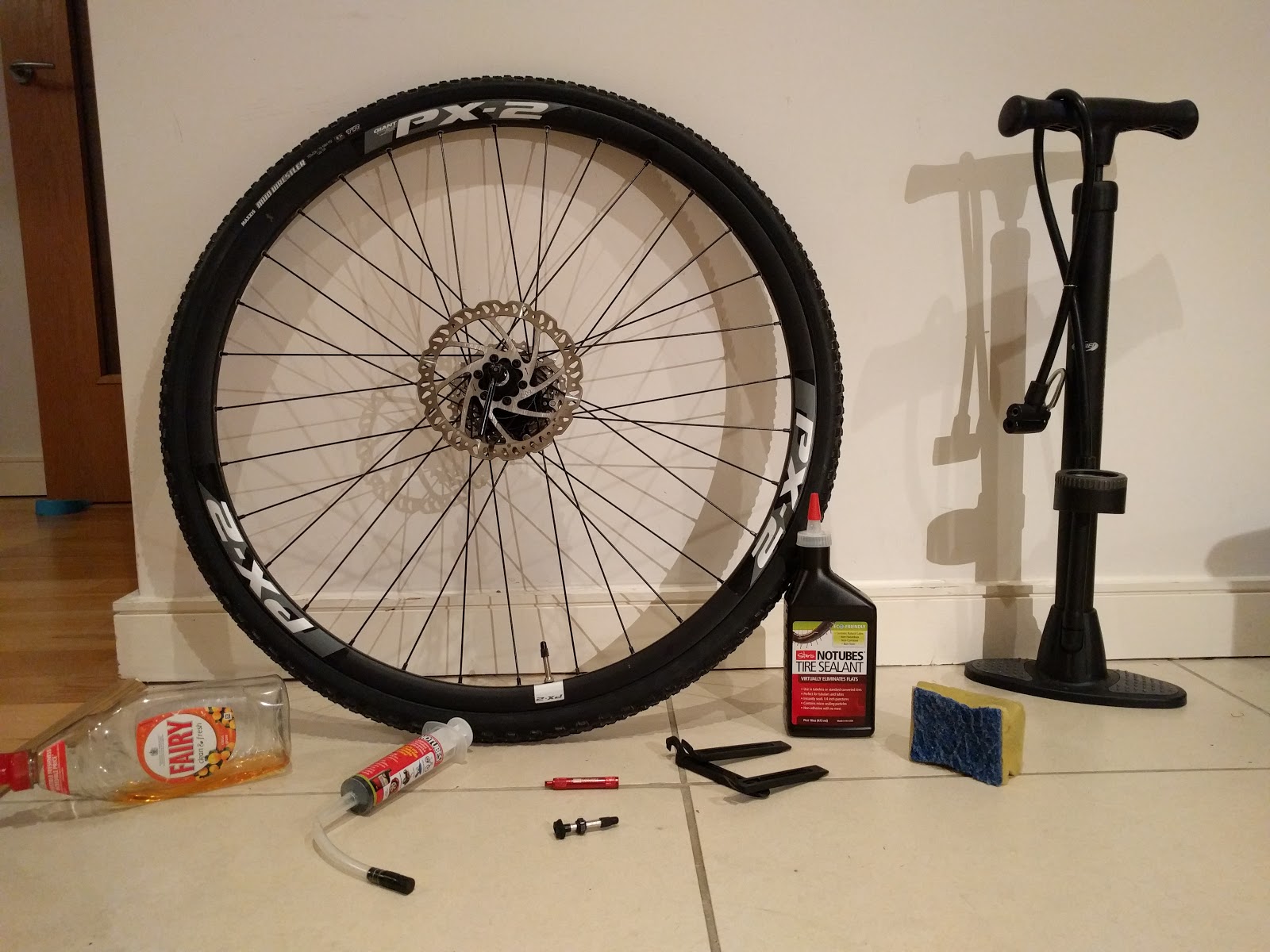
What you will need:

  • Tubeless Compatible wheel; Giant PX-2 Wheelset, although wheels without spoke holes in the rim are best, like the DT Swiss rims.
  • Tubeless Ready tyre; Maxxis Mud Wrestler EXO TR,
  • Tubeless Valve Stems; ones with removable cores are the best,
  • Tubeless kit: Sealant, Yellow Tape, Valve Core Remover and Sealant Injector,
  • Tyre Levers; plastic are recommended,
  • Soap Application kit; Sponge, Sink and Dish Soap,
  • Tyre Inflation Device, i.e. a pump,
  • An Inner tube, for the initial seating/rounding of the tyre,
  • Patience and a Work Ethic,
  • A sense of humour, as there are some dodgy jokes in this article.

Process

Where I fucked up: Install Stan's Yellow tape over the Blue Rim Strip. Do this first. It makes it easier when air is seeping out of the spoke holes.

Other Notes: The Stan's black Rim Strips didn't bring me any success. I couldn't get the tyre to seat at the valve using these.


Put on the tyre, get it aligned and the thread direction correct. Install a tube and inflate it, this will seat one side.
Tubeless tyre with a tube inside to seat one side.


Deflate the tyre, unseat ONE SIDE of the tyre, and remove the tube. In the picture, I should have the Yellow Tape installed.
Keep one side seated as you remove the tube.


Install the Valve stem. Twist on the  Again, I should have the Yellow Tape installed here.
Valve Stem Installed.


Put back on the unseated bead and try to get it as high up the rim as possible, so it will seat faster. Apply the Dish Soap to the unseated seated side, to create a temporary seal. Now take a few deep breaths, mentally prepare yourself for the upcoming struggle. Pump it, pump it like there's no tomorrow. I aimed for 60psi (4.1bar).
Pump it like you're a pornstar.


I missed the picture where I'm injecting the sealant. I put 60ml (2oz) in a tyre with the Yellow Tape, and 90ml (3oz) in a tyre without the Yellow Tape. Add more air and distribute the Sealant inside the tyre. Shake that tyre, like you're an irresponsible baby sitter. I had problems with air coming out of the spoke holes, so I put the holes at the bottom, grabbed the tyre by it's outsides (3 & 9 o'clock positions) and flipped it backwards really fast a few times, until it stopped leaking.


Leave the tyre on each side for five minutes. This will seal the side walls.
Seal the sidewalls.

Wait a while before riding the tyres. Take them on short rides near your home at the start. Enjoy life with less PSI.
reade more... Résuméabuiyad

Android Database Tutorial - Basic SQLite DB


UPDATE: This is superseded by the Room Database Tutorial.

Here is the new tutorial: Room Database, Fragments, RecyclerView, LiveData, ViewModel and Data Binding

Is this what you're looking for?

The areas of Android Development that are touched on in this tutorial are:
  • SQLiteOpenHelper - For Database purposes,
  • AsyncTask - To load the ListView without using the Main UI Thread,
  • Thread - To execute queries without using the Main UI Thread,
  • ViewHolder Pattern - To display the BlogPost titles in the ListView,
  • Dynamic Creation of Database Row IDs - a lot of the database logic deals with the BlogPost titles, so I needed a way to handle insertion.

Introduction

I'm making this tutorial as a future reference for myself, and publishing it so it may be a basic step by step guide for others to implement Databases in their Android Application. I have Googled for "Android Database Tutorial". The Google Developer results are confusing, Android Hive is old/erroneous and Vogella's one is really detailed/long.

The App

This will be a tutorial on the basics of creating a database in Android. The end result will be an app that can create records and display them as a ListView. The reason the app is so simple is to remove the clutter, to allow the database to be the main focus of the tutorial.

Also there isn't a whole lot of data integrity checks, logging, user feedback, exception handling here, so keep your panties unbunched.

I can evolve this app in the following ways, and I will with future posts:
  • Advanced Data Types in the Database,
  • Content Providers,
  • RecyclerView for a nice layout to the ListView,
  • ActionBar commands to create and delete BlogPosts,
  • Pulling from a RESTful Service, etc...

Android Database Technology

Android uses an SQLite Database when storing data on the device. You can use a remote database too, but it's best to use a RESTful Web Service to accomplish tasks in that way. Storing content locally is good if the user doesn't have a network connection and wants to view current data, or create data for synching to the cloud later.

Database Implementation Flow

I'll provide a synopsis of the steps below. As Android Database interaction is Model Driven, we'll implement our Model Class first. "Model" is just a fancy word for "POJO", which itself is a fancy word for "Plain Old Java Object". Secondly we'll implement the outline of our Database Class, to provide the foundation to build interactions on. The Database Class will be a Singleton, so only one instance will exist in our app, it's best to get into good practices early. There's two schools of thought on the next step; one, implement the queries as needed, as not to bloat functionality, two, write the CRUD logic up front to reduce development time later on and we're in the database zone at this time. I'd recommend the former for normal development, but for the purposes of keeping this tutorial streamlined, I'll take the latter approach. Finally we'll add the UI Activities to make use of the database functionality.

I have the source code posted to GitHub: Android Database Tutorial-Basic repository. Each of the steps below will be a commit.


Step 0: New App with Blank Activity

This step is optional, you may already have the app that you wish to use the database in. Create the new app, give it a name and select the "Blank Activity" to begin with. I just accepted all the defaults for the naming. As none of that matters much in the context of this tutorial. Close MainActivity.java and activity_main.xml when they open. We'll deal with them later. At this point I added my project to Source Control with git.

Commit Diff: 394ff7f


Step 1: Implement the Model Class

We'll add a new package under our app, for good practice. We'll call it "model". Next add a Java Class, which will be our model. We'll call it "BlogPost". Our app will display words that the user creates in a ListView on screen. With that in mind, here is our simple Model Class, it has the ID and the Title fields.


The ID field always needs to be present in a Model Class that we want to be in the database. The ID is the Primary Key for the database. The Database will start from 1, not from 0 as you'd expect. Hopefully, simple stuff here.

Commit Diff: 391add4


Step 2: Implement the Database Class

In this step, we will create the outline of the Database Class. Add another package, call it "database". Add a Java Class, call it "DatabaseConnection" and the kind will be Singleton.

In our code editor we make it so DatabaseConnection.java extends SQLiteOpenHelper. SQLiteOpenHelper requires that we implement its two abstract methods, onCreate() and onUpgrade(). The lifecycle method onCreate() is called when the app is first launched. In the onCreate() method implementation, we issue a CREATE TABLE command to the database. The lifecycle method onUpgrade() is called when the app is updated to a later version, i.e when an update is installed from the Google Play Store. In the onUpgrade(), you can manage the addition and removal of columns from the database table. But in our implementation, we'll just drop the old database in favour of the new version, which will be created when we call the onCreate() method manually.


Commit Diff: c685b65


Step 3: Basic Queries for our Use Cases

The use cases of this app are;
  1. Create a new BlogPost.
  2. Delete an existing BlogPost,
  3. View all the BlogPosts in the database.
Still in our DatabaseConnection class, we add the following three methods after the onUpgrade() method.


Commit Diff: 16bf861


Step 3 Bonus: The other CRUD queries

The abbreviation CRUD stands for Create, Retrieve, Update and Delete. So far we have the Creation, Deletion and Retrieval of records implementation. Let's see how the Updating and other forms of Retrieval of records are handled with respect to our Model. Again, keeping things simple, we'll ignore the possibility of raising exceptions and handling return codes here.

The following methods are pretty self explanatory, they allow for the retrieval of one record, allow updating of one record, count the records, determine if a record exists, and find the ID of an existing record in the database.


Commit Diff: 2340692


Step 4: UI Activity to Insert, Delete and Display Records


As this tutorial is not about UI programming, I'll just leave code for calling the queries the commit ID, for the rest of the code, here for you to examine. The AsyncTask and ViewHolder Pattern is defined in that Commit ID. The UI is an EditText to input BlogPost titles, then two buttons to Add and Delete the BlogPosts, based on their titles, in the ListView based on their titles matching the text in the EditText.

Loading https://gist.github.com/8488564....

Commit Diff: 7b59a0e, this one is a bit of a mish-mash of updates.


Conclusion

I hope this tutorial was basic enough for novice programmers to understand and comprehensive for intermediate programmers to get ideas of this possibilities of storing data locally on the Android device.

All the code is in the GitHub Repository, AndroidDatabaseTutorial-Basic. If the app fails to build on your IDE, start by changing the "buildToolsVersion" in your "app/build.gradle" to match the version in your SDK Manager.

reade more... Résuméabuiyad

Blogger Custom Domain with Blacknight without "www"

Intorduction

Want to link your fancy custom domain to your Blogger blog/website? Read on my wayward son (and/or daughter(s)).

Step 0: Start the process from the Blogger Console.

Note down the URLs for the final step (or just open a new tab for the Blacknight console). Copy and paste them into the CNAME records near the end of this posts.


Step 1: On the Blacknight Console Select "Registered Domains".

I presume you've already bought the domain.


Step 2: Select "Manage DNS" for your chosen Domain. 


Step 3: Go to the DNS Tab


Step 4: Go to the "DNS Records" and Click "Add New DNS Records".


Step 5: Add the A and CNAME Records.

The A Records are vitally important to the domain redirecting from the "www.domain..." to the "domain...".


Step 6: My table looks like this, remove any "@" records that may be there.


Step 7: Ensure that it's working from the Blogger Console.

Ensure that that "Redirect..." CheckBox is checked.


Step 8: The fun part, let the domain bake in the internet oven.


I hope this worked for you without problems.
reade more... Résuméabuiyad

How to Mute Skype Conversations (Dark Humour Version)

Motivation

We've all had it, we've all been that person, who always has that one extra YouTube video, reaction GIF and/or Emoticon. All the other IM clients of our day have an easily accessible "Mute" button. That is, except for Skype. Skype is basically the inverse of Lync, it's constant "I'm installed you stupid human, like a crazy ex-girlfriend, I'm here to stay and ruin your computing experience" popups were the bane of my life. Life got better when I figured out how to turn off almost all Skype notifications. I wanted to mute some work related conversations that, I wasn't interested in, from triggering the icon appearing on my Windows 7 taskbar.

No longer are we forced to be the social butterfly that our mothers wanted us to be when they forced us to go outside, instead of playing computer games. Unlike our console unplugging mothers, we can ignore these Skype conversations. Enough with me revealing my horrible childhood memories of summers off from school and being forced to play outside. Although I enjoy the outdoors life now, it must've been ingrained into me from when my mother left me in the bog to turn all the turf one summer's day.

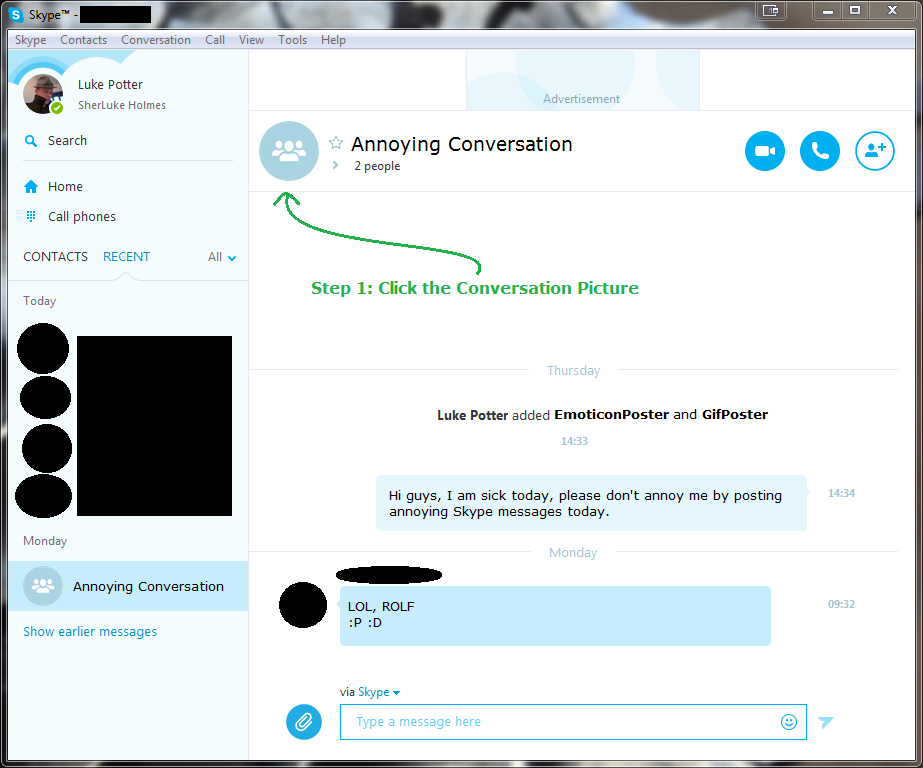
Find the Conversation

Lots of redacted information.
I can be really cranky when I'm pulling a sickie, but it's stressful keeping up appearances. Maybe in the future I'll write a blog post on how to pull a convincing sickie. Although it may not be a great post, as I don't pull sickies and rarely take a day off. Rule number one of being an ass kicker is "Ass kickers don't take days off". You should see my Google Calendar, constant events entitled "Kick Asses" and "Ensure Asses are kicked".


Disable its Notifications

Disable that mofo real good.
Johnny Knoxville could only dream of being this disabled when he starred in "The Ringer". Step 3 is to enjoy your life, knowing that you are not missing out on crappy Skype notifications.


Bonus: My Skype control panel's notification settings

How to make your Skype the equivalent of a Women's Rights under Taliban law*. 

*I'm not well versed in Taliban Law, but I'm pretty sure women have about as many rights as Skype notifications I see.


As per usual, if any of this dark humoured content offends you, please know that I have just kicked your ass through the medium of Blog Posting. NO DAYS OFF ASS KICKING!

Also I love my mother, and I had a great childhood.
reade more... Résuméabuiyad

How to Mute Skype Conversations

Motivation

Skype has many notifications, I don't care about notifications. Google Now has changed how I think about notifications.

Find the Conversation

The above picture is worth 1,000 words, so this caption is basically redundant.


Disable its Notifications

Then just click the "x" button.


Bonus: My Skype control panel's notification settings

This menu comes from "Tools" and "Options".


reade more... Résuméabuiyad

Upgrading my MacBook Pro to 8GB of RAM


Why am I not good enough for you anymore, Luke?

My MacBook Pro (15" from Mid-2010) has been chugging along, but it has been getting slower. I noticed the slowness after upgrading to OSX Yosemite. I did my research on how to do the upgrade and what RAM modules would be the best for my beloved LukeBook Pro (not to be confused with my FaceBook profile, LukeBook).

The main inspiration was a Reddit comment that got picked up as a news story, "With a new SSD and 8GB of RAM, my 4 year old MacBookPro runs like a brand new computer. Total cost: $169.98".

I decided to just upgrade the RAM, and see what difference that would make.

How to do it?


I consulted my the "Memory Upgrade Instructions" on the "About This Mac" screen. This opened a related Apple Support page. I selected my MacBook Pro model and it gave me the information. Mainly the type of RAM and the maximum amount of RAM that my machine would support.


A photo posted by Luke GJ Potter (@lukegjpotter) on
I got the Crucial 8GB RAM from Amazon. I paid €68. It arrived in Dublin at the end of the week. Just in time for some weekend MacBook Pro surgery.

There's many helpful guides and YouTube videos out there on the actual installation.

I took a backup of my system and set about the upgrade.

  1. Unscrew the back cover,
    A photo posted by Luke GJ Potter (@lukegjpotter) on
  2. Optionally remove the dust,
    A photo posted by Luke GJ Potter (@lukegjpotter) on

    A photo posted by Luke GJ Potter (@lukegjpotter) on
  3. Pop out old RAM,
    A photo posted by Luke GJ Potter (@lukegjpotter) on

    A photo posted by Luke GJ Potter (@lukegjpotter) on
  4. Slot in new RAM,
    A photo posted by Luke GJ Potter (@lukegjpotter) on

    A photo posted by Luke GJ Potter (@lukegjpotter) on
  5. Screw on back cover,
  6. Enjoy your 8GB RAM MacBook Pro.

Results

8GB of RAM present.
 Two 4GB RAM modules present.
Lets crack on with our 8GB lives.


Quick Quiz: How many times did I mention that I have a MacBook Pro in this post?
Then again, how do you know that someone has a Windows machine? Don't worry, they'll fucking ask you to fix it.
reade more... Résuméabuiyad